> ## Documentation Index
> Fetch the complete documentation index at: https://docs.probalytics.io/llms.txt
> Use this file to discover all available pages before exploring further.
# File Downloads
> Download bulk prediction market data as Parquet files
Access complete prediction market data via daily bulk file exports.
Bulk exports cover **Markets** and **Fills**. Orderbook snapshots are not available as file downloads — query the `orderbook_snapshots` table directly via SQL instead. See the [SQL Guide](/docs/sql-guide/overview).
## Getting Started
### Access Files
Log into [app.probalytics.io](https://app.probalytics.io) and navigate to the **Files** section.
### Select Data
Use the interface to choose:
* **Platform**: Polymarket or Kalshi
* **Entity type**: Markets or Fills
* **Frequency**:
* **Markets**: Monthly
* **Fills**: Weekly
* **File**: Browse available exports in the file tree
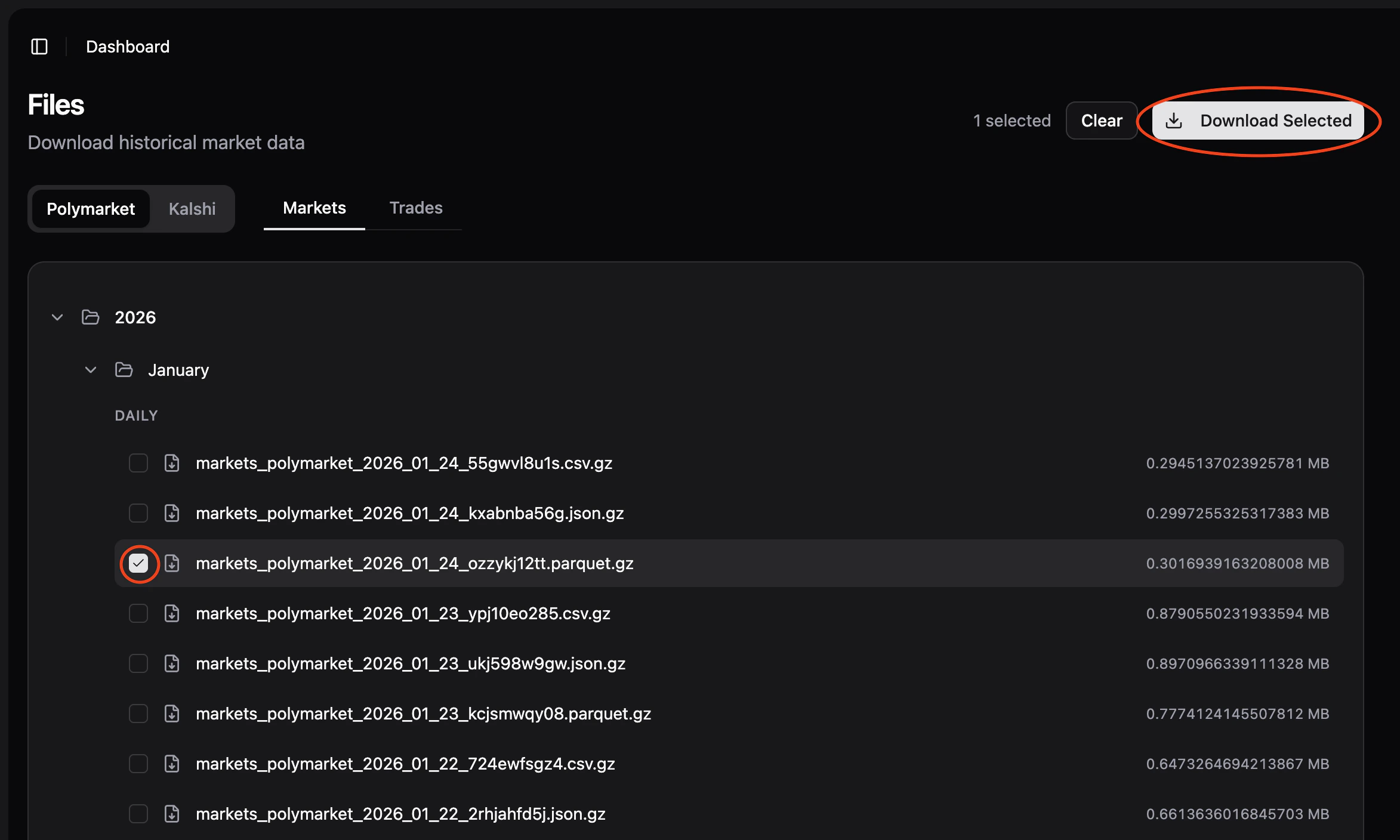 Once a file is selected, the **Download** button appears in the top right. Click to download.
## File Format
All files are exported as **Parquet** (`.parquet.gz`), automatically gzipped for efficient transfer.
* Columnar format, highly compressed
* Native support: Python (pandas, polars), R, Go, Java
* Best performance for analytical queries
## File Naming
Files follow this pattern:
```
{entity}_{platform}_{date_or_range}_{random_id}.parquet.gz
```
Examples:
```
fills_polymarket_2024-01-15_a7k9m2b1.parquet.gz
markets_kalshi_2024-01-10_to_2024-01-15_x3l8n9q2.parquet.gz
markets_polymarket_2024-01_m7q1k3n5.parquet.gz
```
Files are created on the following schedule:
* **Weekly**: Mondays at 02:30 UTC (Fills)
* **Monthly**: First day of month at 03:00 UTC (Markets)
## Parsing Examples
### Python
#### Load and Explore with Pandas
Best for quick analysis and exploration.
```python theme={null}
import pandas as pd
df = pd.read_parquet('fills_polymarket_2024-01-15_a7k9m2b1.parquet.gz')
print(df.head())
print(df.dtypes)
print(df.describe())
```
#### Load and Explore with Polars
Faster for large files, better performance.
```python theme={null}
import polars as pl
df = pl.read_parquet('fills_polymarket_2024-01-15_a7k9m2b1.parquet.gz')
print(df.head())
print(df.schema)
print(df.describe())
```
#### Query and Filter with Polars
Efficient filtering with lazy evaluation.
```python theme={null}
import polars as pl
df = pl.read_parquet('fills_polymarket_2024-01-15_a7k9m2b1.parquet.gz')
# High-value fills
high_value = df.filter(pl.col('size') > 1000)
print(high_value)
# Group by platform and sum size
by_platform = df.groupby('platform').agg(pl.col('size').sum())
print(by_platform)
```
### JavaScript / Node.js
```javascript theme={null}
import { readParquet } from 'parquet-wasm';
import fs from 'fs';
import { gunzipSync } from 'zlib';
const compressed = fs.readFileSync('fills_polymarket_2024-01-15_a7k9m2b1.parquet.gz');
const buffer = gunzipSync(compressed);
const table = readParquet(buffer);
console.log(table.schema);
console.log(`Total rows: ${table.numRows}`);
```
## Common Workflows
### Weekly Export Analysis
Download the weekly fills export for comprehensive weekly analysis:
```python theme={null}
import pandas as pd
# Weekly export (created every Monday)
fills = pd.read_parquet('fills_polymarket_2024-01-14_w2k7m1n3.parquet.gz')
print(f"Total fills: {len(fills)}")
print(fills.groupby('platform')['size'].sum())
```
### Monthly Market Snapshot
Get a complete monthly snapshot of markets:
```python theme={null}
import pandas as pd
# Monthly markets export (created on 1st of month)
markets = pd.read_parquet('markets_kalshi_2024-01_m7q1k3n5.parquet.gz')
print(f"Total markets: {len(markets)}")
print(markets.groupby('category')['status'].value_counts())
```
## Data Schema
Files contain the same data as REST API responses. See the REST API section in the sidebar for complete field definitions and data types.
Once a file is selected, the **Download** button appears in the top right. Click to download.
## File Format
All files are exported as **Parquet** (`.parquet.gz`), automatically gzipped for efficient transfer.
* Columnar format, highly compressed
* Native support: Python (pandas, polars), R, Go, Java
* Best performance for analytical queries
## File Naming
Files follow this pattern:
```
{entity}_{platform}_{date_or_range}_{random_id}.parquet.gz
```
Examples:
```
fills_polymarket_2024-01-15_a7k9m2b1.parquet.gz
markets_kalshi_2024-01-10_to_2024-01-15_x3l8n9q2.parquet.gz
markets_polymarket_2024-01_m7q1k3n5.parquet.gz
```
Files are created on the following schedule:
* **Weekly**: Mondays at 02:30 UTC (Fills)
* **Monthly**: First day of month at 03:00 UTC (Markets)
## Parsing Examples
### Python
#### Load and Explore with Pandas
Best for quick analysis and exploration.
```python theme={null}
import pandas as pd
df = pd.read_parquet('fills_polymarket_2024-01-15_a7k9m2b1.parquet.gz')
print(df.head())
print(df.dtypes)
print(df.describe())
```
#### Load and Explore with Polars
Faster for large files, better performance.
```python theme={null}
import polars as pl
df = pl.read_parquet('fills_polymarket_2024-01-15_a7k9m2b1.parquet.gz')
print(df.head())
print(df.schema)
print(df.describe())
```
#### Query and Filter with Polars
Efficient filtering with lazy evaluation.
```python theme={null}
import polars as pl
df = pl.read_parquet('fills_polymarket_2024-01-15_a7k9m2b1.parquet.gz')
# High-value fills
high_value = df.filter(pl.col('size') > 1000)
print(high_value)
# Group by platform and sum size
by_platform = df.groupby('platform').agg(pl.col('size').sum())
print(by_platform)
```
### JavaScript / Node.js
```javascript theme={null}
import { readParquet } from 'parquet-wasm';
import fs from 'fs';
import { gunzipSync } from 'zlib';
const compressed = fs.readFileSync('fills_polymarket_2024-01-15_a7k9m2b1.parquet.gz');
const buffer = gunzipSync(compressed);
const table = readParquet(buffer);
console.log(table.schema);
console.log(`Total rows: ${table.numRows}`);
```
## Common Workflows
### Weekly Export Analysis
Download the weekly fills export for comprehensive weekly analysis:
```python theme={null}
import pandas as pd
# Weekly export (created every Monday)
fills = pd.read_parquet('fills_polymarket_2024-01-14_w2k7m1n3.parquet.gz')
print(f"Total fills: {len(fills)}")
print(fills.groupby('platform')['size'].sum())
```
### Monthly Market Snapshot
Get a complete monthly snapshot of markets:
```python theme={null}
import pandas as pd
# Monthly markets export (created on 1st of month)
markets = pd.read_parquet('markets_kalshi_2024-01_m7q1k3n5.parquet.gz')
print(f"Total markets: {len(markets)}")
print(markets.groupby('category')['status'].value_counts())
```
## Data Schema
Files contain the same data as REST API responses. See the REST API section in the sidebar for complete field definitions and data types.